---
title: Setting up Kiwi VoIP Fibre on Fritz!Box Modems
description: Setting up a Fritzbox on Kiwi VoIP
---
[Skip to content](https://support.kiwivoip.co.nz/setting-up-kiwi-voip-fibre-on-fritzbox-modems#main-content)
[More support](https://support.kiwivoip.co.nz/kb-tickets/new?hsLang=en-nz) [Submit a Support Ticket](https://support.kiwivoip.co.nz/tickets-view?hsLang=en-nz)
[](https://support.kiwivoip.co.nz/?hsLang=en-nz)
Open main navigation
Close main navigation
- [More support](https://support.kiwivoip.co.nz/kb-tickets/new)
- [Submit a Support Ticket](https://support.kiwivoip.co.nz/tickets-view)
- [Email Us](mailto:support@kiwivoip.co.nz)
[Email Us](mailto:support@kiwivoip.co.nz)
Got a question? We’ve got your back.
- There are no suggestions because the search field is empty.
1. [Knowledge Base](https://support.kiwivoip.co.nz/?hsLang=en-nz)
2. [Internet](https://support.kiwivoip.co.nz/internet?hsLang=en-nz)
3. [Setting Up](https://support.kiwivoip.co.nz/internet?hsLang=en-nz#setting-up)
23 July 2025
# Setting up Kiwi VoIP Fibre on Fritz!Box Modems
Connect your FRITZ!Box to power, and an Ethernet LAN cable to one of the x4 Ethernet
Ports on the back.
Whichever port you set the Fibre connection up on will become the WAN port from which the
other end of the cable needs to be connected to the livened port on your UFB Connection.
Chorus and other Fibre Companies will generally liven up Port 1 (LAN 1) on the ONT
(Optical Network Terminal)
Connect your FRITZ!Box via its URL – http://fritz.box
Once you’ve logged in, click on Internet on the left-hand side then Account Information
Then ‘Internet Connection’
Under ‘Internet Service Provider’
Select ‘Other Internet service provider’
Under name enter Kiwi VoIP
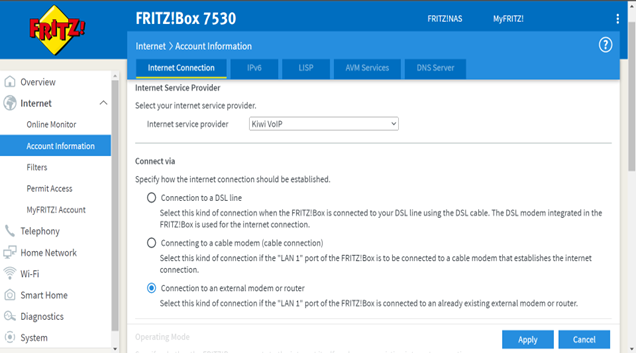
Under ‘Connect via’
Select ‘**External Modem or Router**’
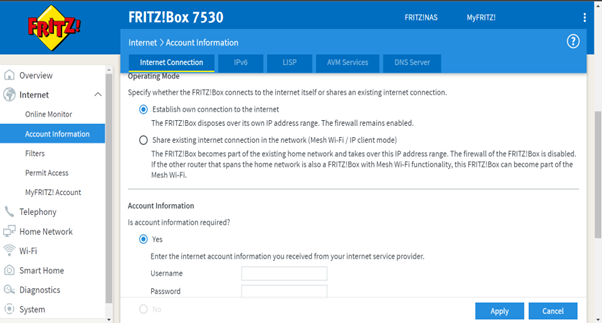
Under ‘Operating Mode’
Select ‘**Make own connection to the Internet**’
Under ‘Account Information’
‘**Is account information required**?’
Select yes
Enter the Username and Password for the connection from your Kiwi VoIP account.
Under ‘Connection Information’
Select ‘**Use VLAN for Internet access**’
Set VLAN-ID as 10
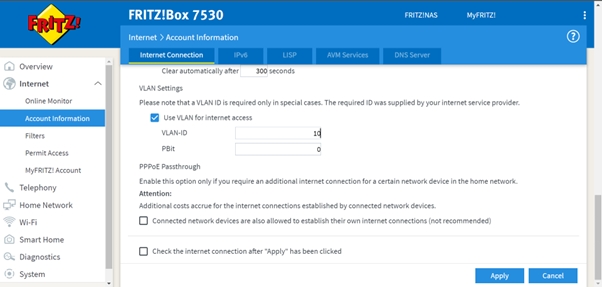
Save the settings by clicking ‘Apply’ and Fritz!Box should display the following message:
‘The procedure was concluded successfully. The Internet Connection will be checked soon.’
This will be followed by:
‘**The Internet Connection check was successful**’
- [Getting Started](https://support.kiwivoip.co.nz/getting-started?hsLang=en-nz#main-content)
- [Simple Settings](https://support.kiwivoip.co.nz/getting-started?hsLang=en-nz#simple-settings)
- [Hardware Phones (Yealink and others)](https://support.kiwivoip.co.nz/getting-started?hsLang=en-nz#hardware-phones-yealink-and-others)
- [PBX Systems (3CX, Freepbx, etc)](https://support.kiwivoip.co.nz/getting-started?hsLang=en-nz#pbx-systems-3cx-freepbx-etc)
- [ATA's](https://support.kiwivoip.co.nz/getting-started?hsLang=en-nz#atas)
- [Billing and Admin](https://support.kiwivoip.co.nz/billing-and-admin?hsLang=en-nz#main-content)
- [Your Account](https://support.kiwivoip.co.nz/billing-and-admin?hsLang=en-nz#your-account)
- [Internet](https://support.kiwivoip.co.nz/billing-and-admin?hsLang=en-nz#internet)
- [Porting](https://support.kiwivoip.co.nz/billing-and-admin?hsLang=en-nz#porting)
- [Pricing](https://support.kiwivoip.co.nz/billing-and-admin?hsLang=en-nz#pricing)
- [Cloud PBX](https://support.kiwivoip.co.nz/cloud-pbx?hsLang=en-nz#main-content)
- [Features](https://support.kiwivoip.co.nz/cloud-pbx?hsLang=en-nz#features)
- [Inbound Calls](https://support.kiwivoip.co.nz/cloud-pbx?hsLang=en-nz#inbound-calls)
- [Outbound Calls](https://support.kiwivoip.co.nz/cloud-pbx?hsLang=en-nz#outbound-calls)
- [Advanced Cloud PBX Settings](https://support.kiwivoip.co.nz/cloud-pbx?hsLang=en-nz#advanced-cloud-pbx-settings)
- [Cloud PBX Preferences](https://support.kiwivoip.co.nz/cloud-pbx?hsLang=en-nz#cloud-pbx-preferences)
- [Trunks](https://support.kiwivoip.co.nz/cloud-pbx?hsLang=en-nz#trunks)
- [Deskphones and Softphones Setup](https://support.kiwivoip.co.nz/deskphones-and-softphones-setup?hsLang=en-nz#main-content)
- [Yealink W Series](https://support.kiwivoip.co.nz/deskphones-and-softphones-setup?hsLang=en-nz#yealink-w-series)
- [Cisco SPA](https://support.kiwivoip.co.nz/deskphones-and-softphones-setup?hsLang=en-nz#cisco-spa)
- [Yeastar TA](https://support.kiwivoip.co.nz/deskphones-and-softphones-setup?hsLang=en-nz#yeastar-ta)
- [ATA's](https://support.kiwivoip.co.nz/deskphones-and-softphones-setup?hsLang=en-nz#atas)
- [3CX](https://support.kiwivoip.co.nz/3cx?hsLang=en-nz#main-content)
- [Guides](https://support.kiwivoip.co.nz/3cx?hsLang=en-nz#guides)
- [Hardware Issues](https://support.kiwivoip.co.nz/3cx?hsLang=en-nz#hardware-issues)
- [Trunk / Line Setup](https://support.kiwivoip.co.nz/3cx?hsLang=en-nz#trunk-line-setup)
- [Mobile](https://support.kiwivoip.co.nz/mobile?hsLang=en-nz#main-content)
- [Mobile Sims and Phones](https://support.kiwivoip.co.nz/mobile?hsLang=en-nz#mobile-sims-and-phones)
- [Mobile Plans](https://support.kiwivoip.co.nz/mobile?hsLang=en-nz#mobile-plans)
- [How to get going with Kiwi VoIP Mobile](https://support.kiwivoip.co.nz/mobile?hsLang=en-nz#how-to-get-going-with-kiwi-voip-mobile)
- [Internet](https://support.kiwivoip.co.nz/internet?hsLang=en-nz#main-content)
- [Setting Up](https://support.kiwivoip.co.nz/internet?hsLang=en-nz#setting-up)
- [Help my internet is down](https://support.kiwivoip.co.nz/internet?hsLang=en-nz#help-my-internet-is-down)
- [Files and Folders](https://support.kiwivoip.co.nz/files-and-folders?hsLang=en-nz#main-content)
- [Shared Files](https://support.kiwivoip.co.nz/files-and-folders?hsLang=en-nz#shared-files)
- [General](https://support.kiwivoip.co.nz/general?hsLang=en-nz#main-content)
- [FAQ](https://support.kiwivoip.co.nz/general?hsLang=en-nz#faq)
- [Security](https://support.kiwivoip.co.nz/general?hsLang=en-nz#security)
- [Misc Guides / Help / Problems](https://support.kiwivoip.co.nz/general?hsLang=en-nz#misc-guides-help-problems)
- [Tech Guides (non VoIP)](https://support.kiwivoip.co.nz/tech-guides-non-voip?hsLang=en-nz#main-content)
- [Unifi](https://support.kiwivoip.co.nz/tech-guides-non-voip?hsLang=en-nz#unifi)
- [Router Configuration](https://support.kiwivoip.co.nz/router-configuration?hsLang=en-nz)
[](https://www.kiwivoip.co.nz)
##### [Terms & Conditions](https://www.kiwivoip.co.nz/terms-conditions) | [Mobile Terms & Conditions](https://www.kiwivoip.co.nz/mobile-terms-conditions)
[mailto:helpdesk@kiwivoip.co.nz](mailto:helpdesk@kiwivoip.co.nz)
Copyright © 2025, Kiwi VoIP