---
title: 🔔 How to setup Simultaneous ring
description: Set up Simultaneous Ring with Kiwi VoIP to ring multiple phones at once. Route calls to mobiles, extensions, or international numbers — with time control and delay
---
[Skip to content](https://support.kiwivoip.co.nz/simultaneous-ring#main-content)
[More support](https://support.kiwivoip.co.nz/kb-tickets/new?hsLang=en-nz) [Submit a Support Ticket](https://support.kiwivoip.co.nz/tickets-view?hsLang=en-nz)
[](https://support.kiwivoip.co.nz/?hsLang=en-nz)
Open main navigation
Close main navigation
- [More support](https://support.kiwivoip.co.nz/kb-tickets/new)
- [Submit a Support Ticket](https://support.kiwivoip.co.nz/tickets-view)
- [Email Us](mailto:support@kiwivoip.co.nz)
[Email Us](mailto:support@kiwivoip.co.nz)
Got a question? We’ve got your back.
- There are no suggestions because the search field is empty.
1. [Knowledge Base](https://support.kiwivoip.co.nz/?hsLang=en-nz)
2. [Cloud PBX](https://support.kiwivoip.co.nz/cloud-pbx?hsLang=en-nz)
3. [Inbound Calls](https://support.kiwivoip.co.nz/cloud-pbx?hsLang=en-nz#inbound-calls)
16 July 2025
# 🔔 How to setup Simultaneous ring
## Learn how to make your phone ring on multiple devices simultaneously and configure settings like delayed ringing and work hours.
What is Simultaneous ring? You can make you phone number ring on more than one device at a time. You can even delay the ringing on one device until after a time limit. You can set the extra phones to only ring during work hours or after hours.
1. Login to your portal on [https://portal.kiwivoip.co.nz](https://portal.kiwivoip.co.nz/)
2. Click on Cloud PBX in the top menu

3. From the numbers listed on the web page click the number you want to work on
4. You will get a menu like this
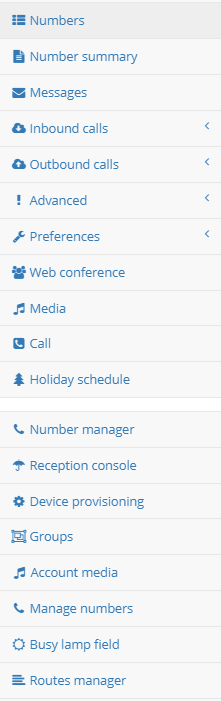
5. Click on Inbound Calls, the menu will expand to look like this

6. Click on Simultaneous ring

7. You will see a new menu in the middle like this

8. Tick the enable number, then put in the number you want to ring at the same time. This can be a number in your account (maybe an extn) or it can be a mobile, or if you want it could be a overseas number.
9. Tick the hunt mode
10. The Ring this number box “At all times” is based on your time schedules [( if you would like to read more on how to setup your time schedules click here)](http://help.kiwivoip.co.nz/support/solutions/articles/51000019484-how-to-set-available-work-hours)
11. If you would like to delay the time until the number rings enter this here. Remember around 3 seconds is your average ring time.
12. Enter as many numbers you want to ring (up to 10) and click Save at the bottom of the page.
- [Getting Started](https://support.kiwivoip.co.nz/getting-started?hsLang=en-nz#main-content)
- [Simple Settings](https://support.kiwivoip.co.nz/getting-started?hsLang=en-nz#simple-settings)
- [Hardware Phones (Yealink and others)](https://support.kiwivoip.co.nz/getting-started?hsLang=en-nz#hardware-phones-yealink-and-others)
- [PBX Systems (3CX, Freepbx, etc)](https://support.kiwivoip.co.nz/getting-started?hsLang=en-nz#pbx-systems-3cx-freepbx-etc)
- [ATA's](https://support.kiwivoip.co.nz/getting-started?hsLang=en-nz#atas)
- [Billing and Admin](https://support.kiwivoip.co.nz/billing-and-admin?hsLang=en-nz#main-content)
- [Your Account](https://support.kiwivoip.co.nz/billing-and-admin?hsLang=en-nz#your-account)
- [Internet](https://support.kiwivoip.co.nz/billing-and-admin?hsLang=en-nz#internet)
- [Porting](https://support.kiwivoip.co.nz/billing-and-admin?hsLang=en-nz#porting)
- [Pricing](https://support.kiwivoip.co.nz/billing-and-admin?hsLang=en-nz#pricing)
- [Cloud PBX](https://support.kiwivoip.co.nz/cloud-pbx?hsLang=en-nz#main-content)
- [Features](https://support.kiwivoip.co.nz/cloud-pbx?hsLang=en-nz#features)
- [Inbound Calls](https://support.kiwivoip.co.nz/cloud-pbx?hsLang=en-nz#inbound-calls)
- [Outbound Calls](https://support.kiwivoip.co.nz/cloud-pbx?hsLang=en-nz#outbound-calls)
- [Advanced Cloud PBX Settings](https://support.kiwivoip.co.nz/cloud-pbx?hsLang=en-nz#advanced-cloud-pbx-settings)
- [Cloud PBX Preferences](https://support.kiwivoip.co.nz/cloud-pbx?hsLang=en-nz#cloud-pbx-preferences)
- [Trunks](https://support.kiwivoip.co.nz/cloud-pbx?hsLang=en-nz#trunks)
- [Deskphones and Softphones Setup](https://support.kiwivoip.co.nz/deskphones-and-softphones-setup?hsLang=en-nz#main-content)
- [Yealink W Series](https://support.kiwivoip.co.nz/deskphones-and-softphones-setup?hsLang=en-nz#yealink-w-series)
- [Cisco SPA](https://support.kiwivoip.co.nz/deskphones-and-softphones-setup?hsLang=en-nz#cisco-spa)
- [Yeastar TA](https://support.kiwivoip.co.nz/deskphones-and-softphones-setup?hsLang=en-nz#yeastar-ta)
- [ATA's](https://support.kiwivoip.co.nz/deskphones-and-softphones-setup?hsLang=en-nz#atas)
- [3CX](https://support.kiwivoip.co.nz/3cx?hsLang=en-nz#main-content)
- [Guides](https://support.kiwivoip.co.nz/3cx?hsLang=en-nz#guides)
- [Hardware Issues](https://support.kiwivoip.co.nz/3cx?hsLang=en-nz#hardware-issues)
- [Trunk / Line Setup](https://support.kiwivoip.co.nz/3cx?hsLang=en-nz#trunk-line-setup)
- [Mobile](https://support.kiwivoip.co.nz/mobile?hsLang=en-nz#main-content)
- [Mobile Sims and Phones](https://support.kiwivoip.co.nz/mobile?hsLang=en-nz#mobile-sims-and-phones)
- [Mobile Plans](https://support.kiwivoip.co.nz/mobile?hsLang=en-nz#mobile-plans)
- [How to get going with Kiwi VoIP Mobile](https://support.kiwivoip.co.nz/mobile?hsLang=en-nz#how-to-get-going-with-kiwi-voip-mobile)
- [Internet](https://support.kiwivoip.co.nz/internet?hsLang=en-nz#main-content)
- [Setting Up](https://support.kiwivoip.co.nz/internet?hsLang=en-nz#setting-up)
- [Help my internet is down](https://support.kiwivoip.co.nz/internet?hsLang=en-nz#help-my-internet-is-down)
- [Files and Folders](https://support.kiwivoip.co.nz/files-and-folders?hsLang=en-nz#main-content)
- [Shared Files](https://support.kiwivoip.co.nz/files-and-folders?hsLang=en-nz#shared-files)
- [General](https://support.kiwivoip.co.nz/general?hsLang=en-nz#main-content)
- [FAQ](https://support.kiwivoip.co.nz/general?hsLang=en-nz#faq)
- [Security](https://support.kiwivoip.co.nz/general?hsLang=en-nz#security)
- [Misc Guides / Help / Problems](https://support.kiwivoip.co.nz/general?hsLang=en-nz#misc-guides-help-problems)
- [Tech Guides (non VoIP)](https://support.kiwivoip.co.nz/tech-guides-non-voip?hsLang=en-nz#main-content)
- [Unifi](https://support.kiwivoip.co.nz/tech-guides-non-voip?hsLang=en-nz#unifi)
- [Router Configuration](https://support.kiwivoip.co.nz/router-configuration?hsLang=en-nz)
[](https://www.kiwivoip.co.nz)
##### [Terms & Conditions](https://www.kiwivoip.co.nz/terms-conditions) | [Mobile Terms & Conditions](https://www.kiwivoip.co.nz/mobile-terms-conditions)
[mailto:helpdesk@kiwivoip.co.nz](mailto:helpdesk@kiwivoip.co.nz)
Copyright © 2025, Kiwi VoIP