---
title: 🌐 Kiwi VoIP – Using VoIP Phones with Mesh Networks & Starlink
description: Experiencing VoIP issues with Starlink or mesh Wi-Fi? Learn how to fix call drops, audio issues, and registration problems with our expert Kiwi VoIP setup guide.
---
[Skip to content](https://support.kiwivoip.co.nz/voip-with-starlink-and-mesh#main-content)
[More support](https://support.kiwivoip.co.nz/kb-tickets/new?hsLang=en-nz) [Submit a Support Ticket](https://support.kiwivoip.co.nz/tickets-view?hsLang=en-nz)
[](https://support.kiwivoip.co.nz/?hsLang=en-nz)
Open main navigation
Close main navigation
- [More support](https://support.kiwivoip.co.nz/kb-tickets/new)
- [Submit a Support Ticket](https://support.kiwivoip.co.nz/tickets-view)
- [Email Us](mailto:support@kiwivoip.co.nz)
[Email Us](mailto:support@kiwivoip.co.nz)
Got a question? We’ve got your back.
- There are no suggestions because the search field is empty.
1. [Knowledge Base](https://support.kiwivoip.co.nz/?hsLang=en-nz)
2. [Internet](https://support.kiwivoip.co.nz/internet?hsLang=en-nz)
3. [Setting Up](https://support.kiwivoip.co.nz/internet?hsLang=en-nz#setting-up)
16 July 2025
# 🌐 Kiwi VoIP – Using VoIP Phones with Mesh Networks & Starlink
As homes and offices become more connected, **Wi-Fi Mesh networks** are increasingly common — especially in properties with multiple levels or wide coverage areas. However, if you're running **VoIP phones or PBX systems over a mesh network**, particularly with **Starlink**, you may encounter issues that affect call quality.
This guide explains **common problems**, why they happen, and how to fix them.
---
#### 📶 Background: Mesh Networks & Starlink
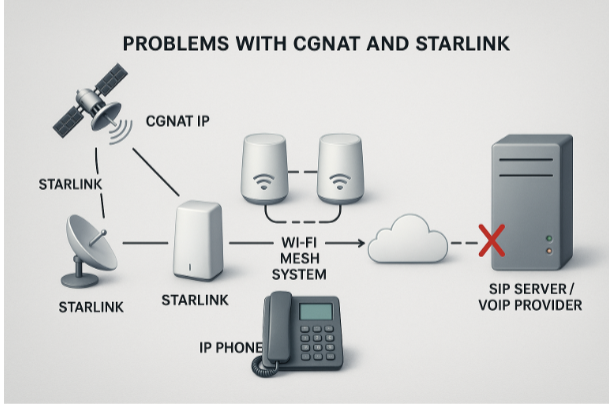
Wi-Fi mesh systems are designed to extend wireless coverage seamlessly across a home or building. They work great for most devices — but when it comes to **real-time services like VoIP**, things can get tricky.
### Why?
When combined with **Starlink** or any **double NAT (CGNAT)** environment, your **IP phone might not communicate correctly** with the SIP server — leading to issues like:
- One-way or no audio
- Calls connecting then dropping
- Registration timeouts or failed provisioning
### What’s Happening?
Here’s a simplified explanation:
- The **mesh system assigns the IP address**, not the main Starlink router
- VoIP traffic is routed poorly or blocked altogether
- The SIP server struggles to “find” or return packets to the phone
---
#### 🔧 Common Fixes & Solutions
### ✅ 1. Enable Starlink Bypass Mode
- Use the **Starlink app** to enable “Bypass Mode”
- This turns off Starlink’s router function and allows your mesh to handle all routing/DHCP
- Restart your **IP phone**, **mesh**, and **router** after changes
> **Why this helps:** Ensures consistent routing for SIP packets and avoids double NAT issues
---
### ✅ 2. Use a Network Switch for Direct Connections
- Plug a **network switch** directly into your Starlink Ethernet Adapter
- Connect your **VoIP phone to one port**, and your **Wi-Fi Mesh to another**
- Disable DHCP on the mesh if possible (so the phone gets IP from Starlink router)
> **Check this:** If your IP phone shows an address like `192.168.x.x`, it’s likely being served by the correct DHCP source.
---
### ✅ 3. Disable SIP ALG
- Log into your mesh system or router
- **Disable SIP ALG** (Application Layer Gateway)
- This setting interferes with SIP traffic and should always be turned off
---
### ✅ 4. Change Transport from UDP to TLS
- Go into your IP phone or PBX settings
- Switch SIP transport protocol from:
- **UDP Port 5060 → TLS Port 5061**
- In many tests, TLS performs better on Starlink connections
---
#### 🧠 Summary
| Issue | Cause | Fix |
| --- | --- | --- |
| One-way/no audio | Mesh handling NAT poorly | Enable Bypass Mode or use a direct switch |
| Calls drop after a few seconds | SIP packets not routed | Use TLS or disable SIP ALG |
| Phones not registering | Incorrect DHCP source | Ensure correct network role/DHCP provider |
- [Getting Started](https://support.kiwivoip.co.nz/getting-started?hsLang=en-nz#main-content)
- [Simple Settings](https://support.kiwivoip.co.nz/getting-started?hsLang=en-nz#simple-settings)
- [Hardware Phones (Yealink and others)](https://support.kiwivoip.co.nz/getting-started?hsLang=en-nz#hardware-phones-yealink-and-others)
- [PBX Systems (3CX, Freepbx, etc)](https://support.kiwivoip.co.nz/getting-started?hsLang=en-nz#pbx-systems-3cx-freepbx-etc)
- [ATA's](https://support.kiwivoip.co.nz/getting-started?hsLang=en-nz#atas)
- [Billing and Admin](https://support.kiwivoip.co.nz/billing-and-admin?hsLang=en-nz#main-content)
- [Your Account](https://support.kiwivoip.co.nz/billing-and-admin?hsLang=en-nz#your-account)
- [Internet](https://support.kiwivoip.co.nz/billing-and-admin?hsLang=en-nz#internet)
- [Porting](https://support.kiwivoip.co.nz/billing-and-admin?hsLang=en-nz#porting)
- [Pricing](https://support.kiwivoip.co.nz/billing-and-admin?hsLang=en-nz#pricing)
- [Cloud PBX](https://support.kiwivoip.co.nz/cloud-pbx?hsLang=en-nz#main-content)
- [Features](https://support.kiwivoip.co.nz/cloud-pbx?hsLang=en-nz#features)
- [Inbound Calls](https://support.kiwivoip.co.nz/cloud-pbx?hsLang=en-nz#inbound-calls)
- [Outbound Calls](https://support.kiwivoip.co.nz/cloud-pbx?hsLang=en-nz#outbound-calls)
- [Advanced Cloud PBX Settings](https://support.kiwivoip.co.nz/cloud-pbx?hsLang=en-nz#advanced-cloud-pbx-settings)
- [Cloud PBX Preferences](https://support.kiwivoip.co.nz/cloud-pbx?hsLang=en-nz#cloud-pbx-preferences)
- [Trunks](https://support.kiwivoip.co.nz/cloud-pbx?hsLang=en-nz#trunks)
- [Deskphones and Softphones Setup](https://support.kiwivoip.co.nz/deskphones-and-softphones-setup?hsLang=en-nz#main-content)
- [Yealink W Series](https://support.kiwivoip.co.nz/deskphones-and-softphones-setup?hsLang=en-nz#yealink-w-series)
- [Cisco SPA](https://support.kiwivoip.co.nz/deskphones-and-softphones-setup?hsLang=en-nz#cisco-spa)
- [Yeastar TA](https://support.kiwivoip.co.nz/deskphones-and-softphones-setup?hsLang=en-nz#yeastar-ta)
- [ATA's](https://support.kiwivoip.co.nz/deskphones-and-softphones-setup?hsLang=en-nz#atas)
- [3CX](https://support.kiwivoip.co.nz/3cx?hsLang=en-nz#main-content)
- [Guides](https://support.kiwivoip.co.nz/3cx?hsLang=en-nz#guides)
- [Hardware Issues](https://support.kiwivoip.co.nz/3cx?hsLang=en-nz#hardware-issues)
- [Trunk / Line Setup](https://support.kiwivoip.co.nz/3cx?hsLang=en-nz#trunk-line-setup)
- [Mobile](https://support.kiwivoip.co.nz/mobile?hsLang=en-nz#main-content)
- [Mobile Sims and Phones](https://support.kiwivoip.co.nz/mobile?hsLang=en-nz#mobile-sims-and-phones)
- [Mobile Plans](https://support.kiwivoip.co.nz/mobile?hsLang=en-nz#mobile-plans)
- [How to get going with Kiwi VoIP Mobile](https://support.kiwivoip.co.nz/mobile?hsLang=en-nz#how-to-get-going-with-kiwi-voip-mobile)
- [Internet](https://support.kiwivoip.co.nz/internet?hsLang=en-nz#main-content)
- [Setting Up](https://support.kiwivoip.co.nz/internet?hsLang=en-nz#setting-up)
- [Help my internet is down](https://support.kiwivoip.co.nz/internet?hsLang=en-nz#help-my-internet-is-down)
- [Files and Folders](https://support.kiwivoip.co.nz/files-and-folders?hsLang=en-nz#main-content)
- [Shared Files](https://support.kiwivoip.co.nz/files-and-folders?hsLang=en-nz#shared-files)
- [General](https://support.kiwivoip.co.nz/general?hsLang=en-nz#main-content)
- [FAQ](https://support.kiwivoip.co.nz/general?hsLang=en-nz#faq)
- [Security](https://support.kiwivoip.co.nz/general?hsLang=en-nz#security)
- [Misc Guides / Help / Problems](https://support.kiwivoip.co.nz/general?hsLang=en-nz#misc-guides-help-problems)
- [Tech Guides (non VoIP)](https://support.kiwivoip.co.nz/tech-guides-non-voip?hsLang=en-nz#main-content)
- [Unifi](https://support.kiwivoip.co.nz/tech-guides-non-voip?hsLang=en-nz#unifi)
- [Router Configuration](https://support.kiwivoip.co.nz/router-configuration?hsLang=en-nz)
[](https://www.kiwivoip.co.nz)
##### [Terms & Conditions](https://www.kiwivoip.co.nz/terms-conditions) | [Mobile Terms & Conditions](https://www.kiwivoip.co.nz/mobile-terms-conditions)
[mailto:helpdesk@kiwivoip.co.nz](mailto:helpdesk@kiwivoip.co.nz)
Copyright © 2025, Kiwi VoIP